EDIUS XRE Transcoder 9 for EDIUS 9: Multiformat/Multicodec Video File Transcoder

This Solution includes EDIUS XRE for rendering EDIUS Projects on Servers
edius_xre


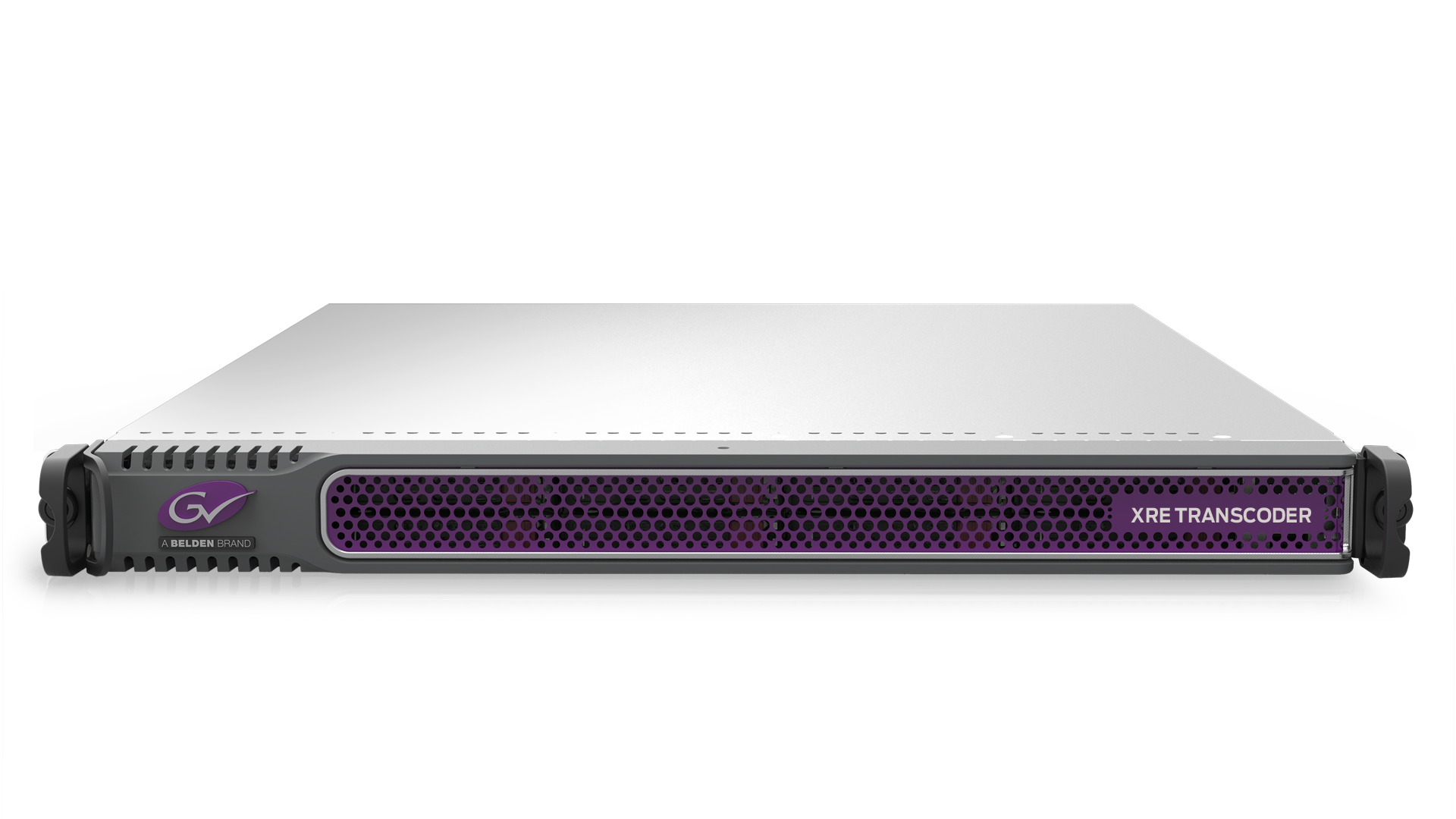
The XRE Transcoder is a standalone conversion solution that enables broadcasters and media companies to automate the transcoding of media files, using watch folders that can be placed anywhere on a network. Transcoding is fully optimized to the host machine’s specifications and is faster than real-time in many cases.


Key Features

  • Purpose-built transcoding system leveraging powerful EDIUS NLE format support
  • Can be used with EDIUS and third-party NLEs
  • Watch folder functionality
  • Job monitor for creating watch folders, managing and monitoring jobs
  • Can process two jobs simultaneously
  • Multiple XRE Transcoders can be used as nodes to process multiple jobs in parallel
  • New "Effect Template" feature to apply effects to clips while transcoding (customised effects such as graphics, filters and image manipulation can be applied automatically)
  • Can also be used to conform/render EDIUS projects
  • Supported video formats: AVCHD, AVI, HDV, MOV, MP4 and MXF
  • Supported audio formats: AAC, AIFF, Dolby Digital, Dolby Digital Professional, Dolby Digital Plus, MPEG Audio Layer-3, MPEG Audio Stream, Ogg Vorbis Files, Wave and Windows Media Audio
  • Supported codecs: H.264, H.265, MPEG-2, XAVC, XAVC S, XDCAM (DV/HD/EX), P2, DVCPRO, AVC Ultra, Apple ProRes, Grass Valley HQ/HQX and DNxHD
  • SDK available to facilitate integration into third-party systems and workflows
  • Convert audio as source to other audio formats or to video
  • Audio normalisation

XRE News from NAB Report 2018


How it works:

Downloads:


Edius XRE Transcoder is delivered as Turnkey System.
Please contact your local reseller for more information.
EDIUS XRE for EDIUS 9: Conform Engine For EDIUS Workgroup

Render EDIUS Projects on Servers

edius_xre


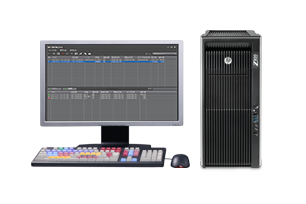
With EDIUS XRE you can create finished files in the background, away from main editing workstations, immediately and automatically. When you render your project output on a separate, dedicated workstation, you will eliminate the delays and inconveniences of waiting for edit stations to open up, so you can spend your time creating more, better content.


Key Features

  • Supplied as a complete turnkey system by the Grass Valley reseller
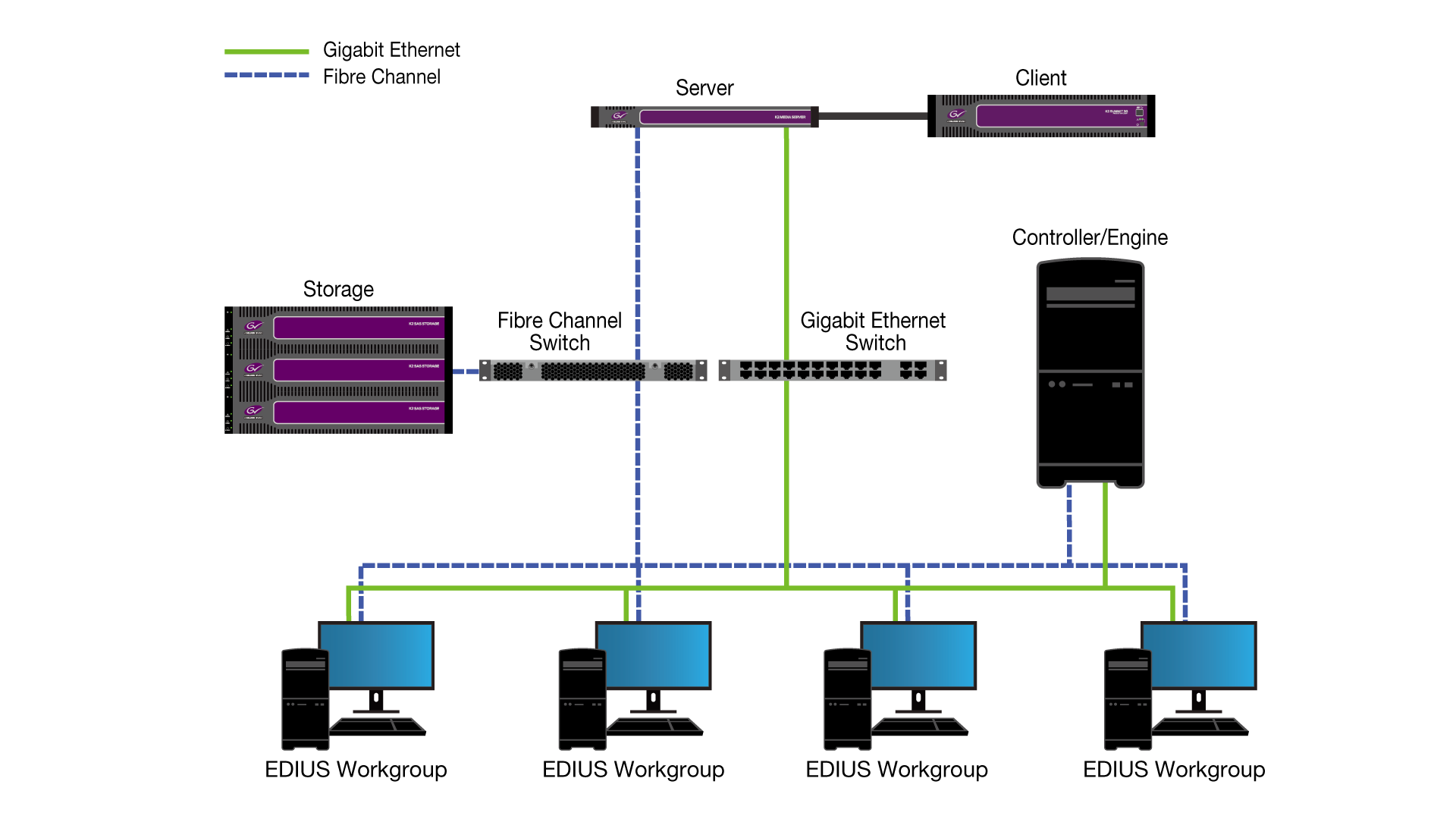
  • Works in an EDIUS Workgroup production system
  • Multiple users can send jobs to a single EDIUS XRE workstation
  • Multiple XRE units can be in the same shared environment
  • Background operation – register a job and continue to use EDIUS while exporting to XRE
  • Easy-to-use, intuitive GUI for job registration and priority management
  • Current job(s) can be suspended or cancelled to allow higher priority jobs to be conformed
  • Supports XDCAM, XAVC, XAVC S, AVC-Intra, AVC-Ultra, MXF, CMF and Grass Valley HQX

Workgroup Schematic:

Downloads:


Edius XRE is delivered as Turnkey System.
Please contact your local reseller for more information.
Grass Valley T2 4K Series

4K/HD Digital Recorder/Players with EDIUS support

edius_xre
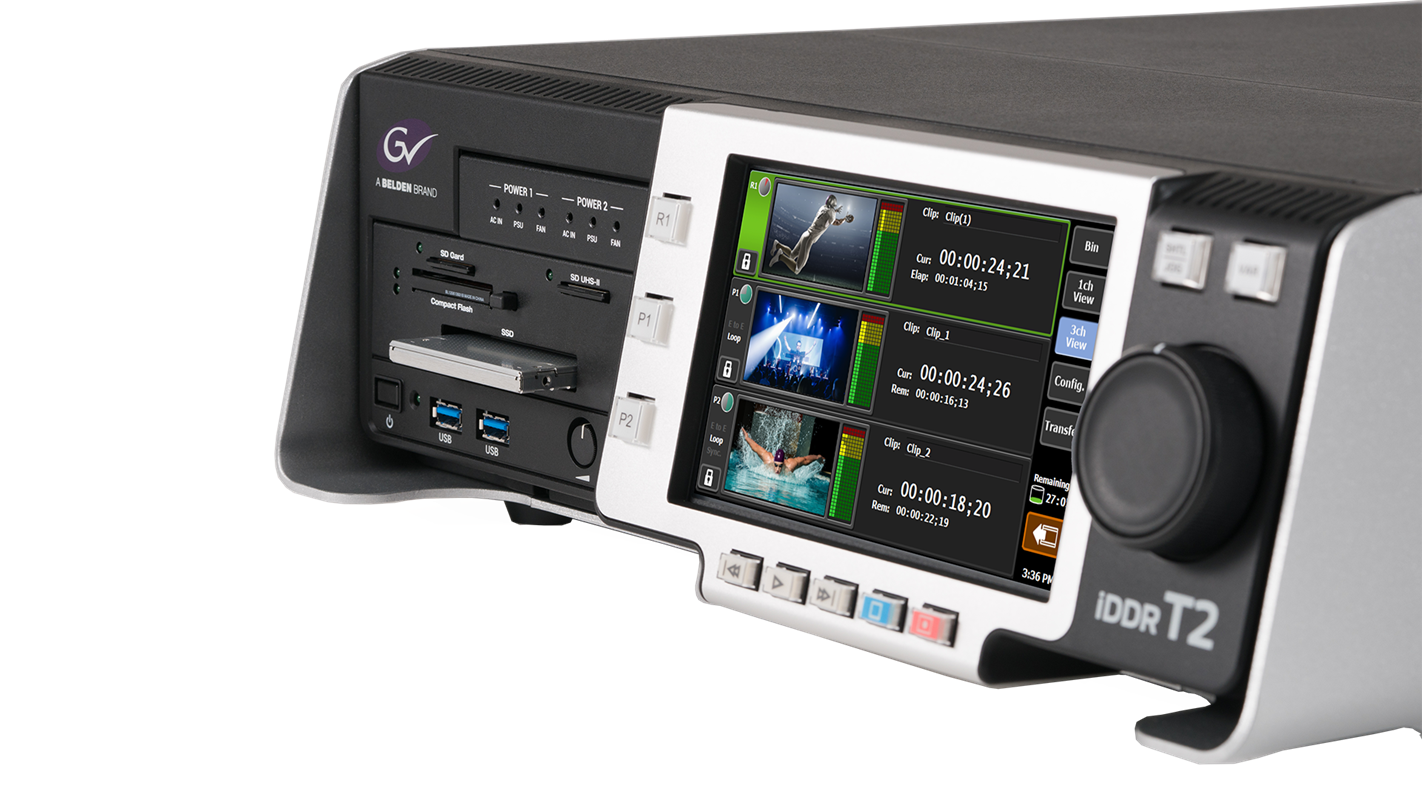
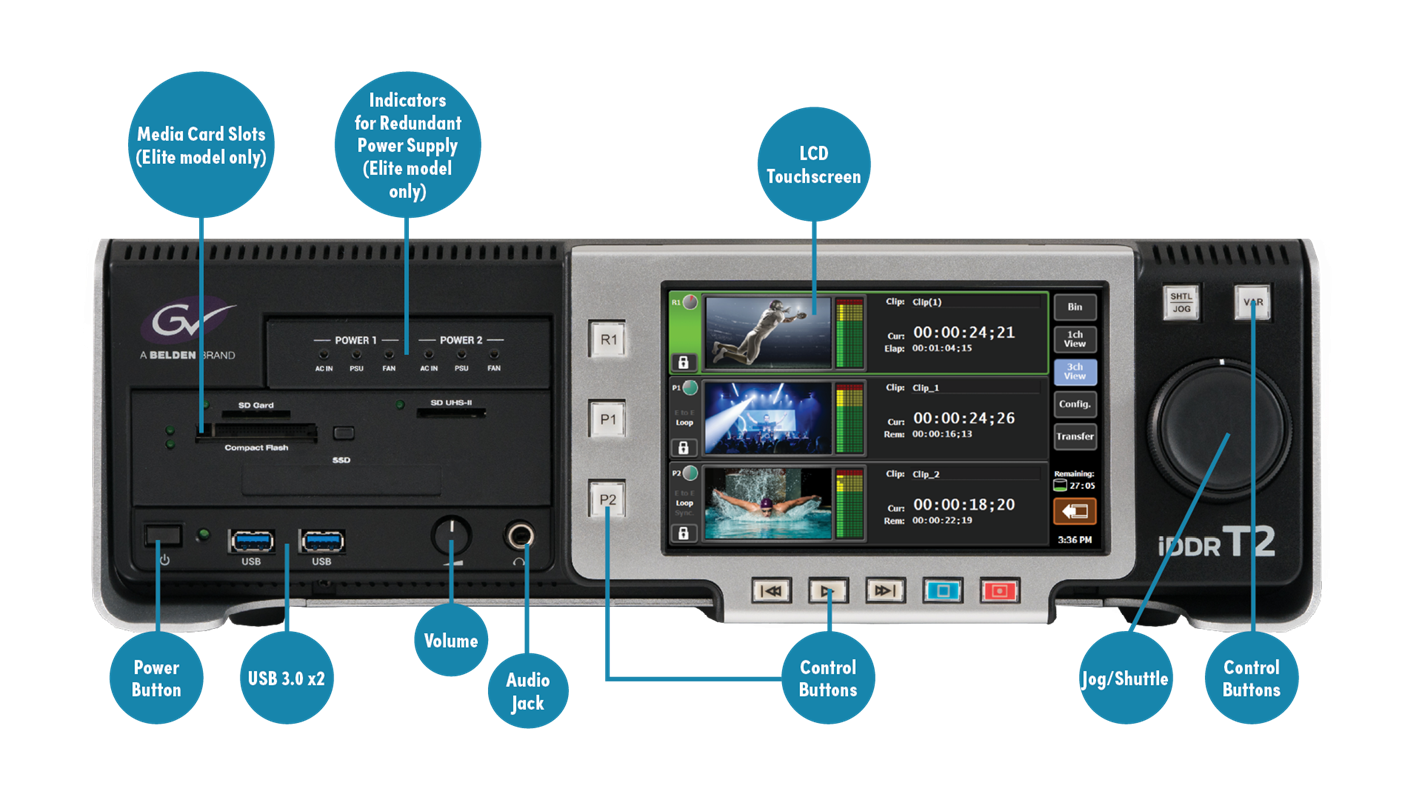
The T2 4K digital recorder/players are 4K DCI, 4K UHD or HD/SD audio/video playout centers, available in three configurations for virtually every situation. The front-panel transport controls have the look and feel of a traditional VTR. In 4K mode (DCI or UHD), one record or one output channel supports 4K content. In HD/SD mode one record and two output channels support SD and HD content. The crisp, clear LCD front panel can display high-quality images and is complemented by a software application suite for managing and selecting media clips, clip editing and trimming, and playout — including playlist creation.

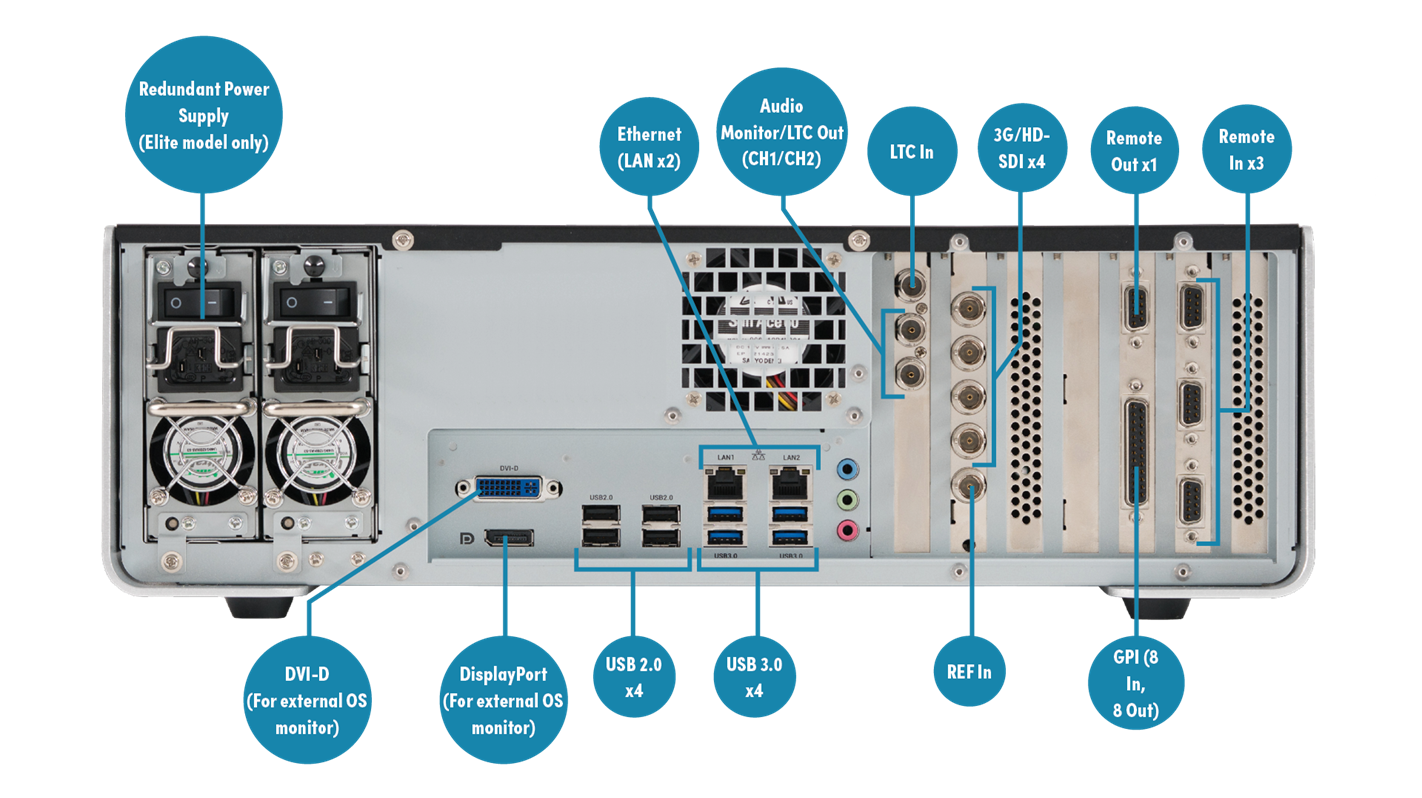
Featuring rear-panel video/audio/remote/LTC connectivity, T2 4K can also accept files via USB 3.0, or by data transfer over a standard Gigabit Ethernet network, including Grass Valley HQX, XAVC, XAVC S, XDCAM, P2, AVC-ULTRA, Apple ProRes 422, Avid DNxHR, Avid DNxHD and MPEG-2 files.

Further, T2 4K digital recorder/players can be controlled by video production switchers, presentation mixers and audio mixers – to create a powerful presentation system. Every T2 4K has two playout HD/SD channels for independent editing and previewing, or for delivering content to two different display systems simultaneously, useful for edge-blending and displaying 3D content.

Applications

  • Events and staging
  • Auditoriums
  • Corporate A/V centers
  • Educational facilities
  • Broadcast display support
  • Regional sports companies
  • Switcher support for playback

Key Features

Recorder/Player
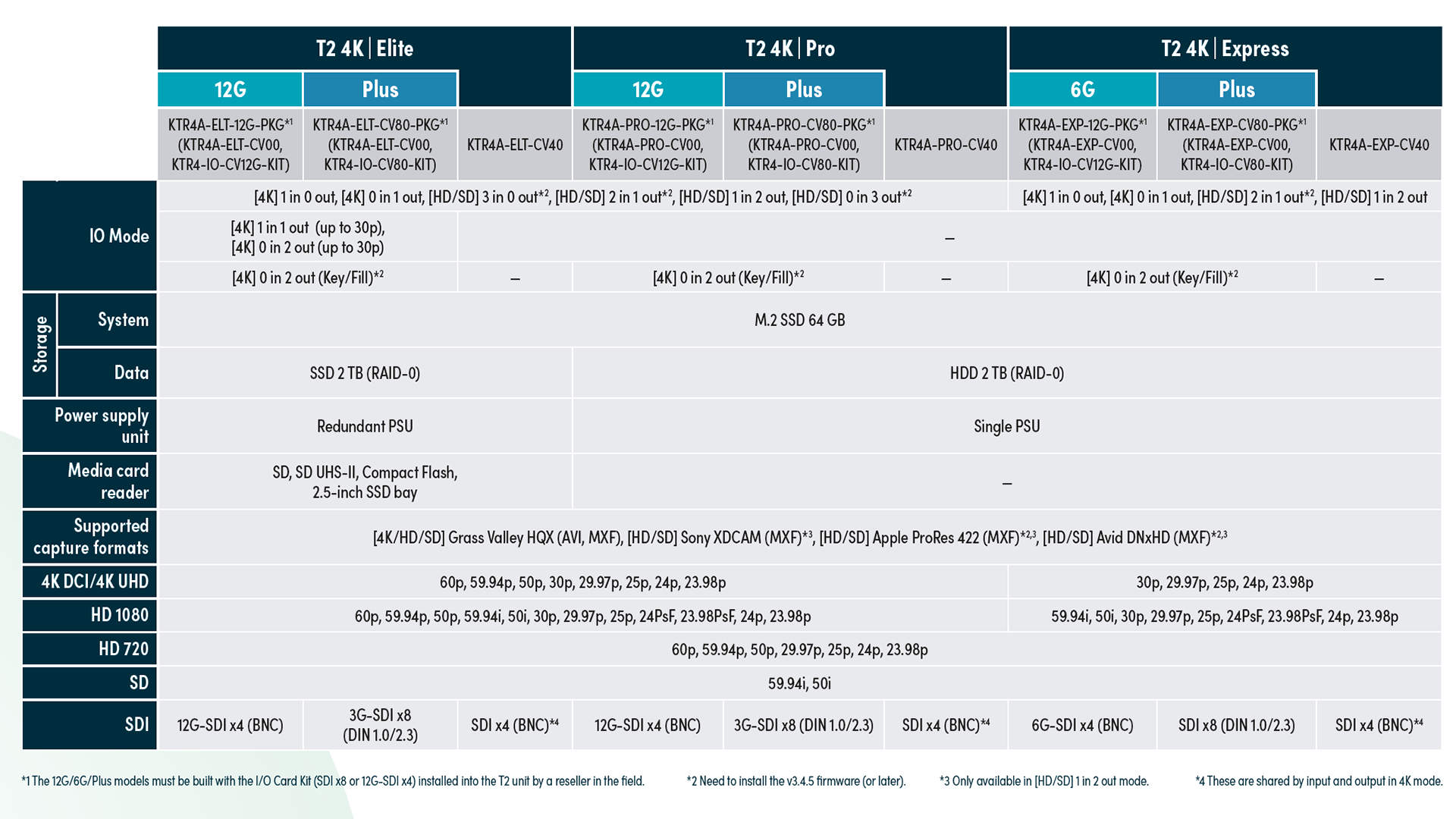
  • 4K (2160p) ingest support (4K: 1 in 0 out mode)
  • 4K (2160p) playback support (4K: 0 in 1 out mode)
  • 4K (2160p — up to 30p) ingest and playback support (4K: 1 in 1 out mode) (Elite 12G and Elite Plus only)
  • 4K (2160p — up to 30p) playback support (4K: 0 in 2 out mode) (Elite 12G and Elite Plus only)
  • 4K (2160p) Key/Fill (Alpha) playback support (4K: 0 in 2 out Key/Fill mode) (Elite 12G, Pro 12G, Express 6G, Elite Plus, Pro Plus and Express Plus only)
  • HD (1080p) ingest and playback support (HD: 1 in 2 out mode)
  • HD (1080p) ingest support (HD: 3 in 0 out mode) (Elite and Pro only)
  • HD (1080p) playback support (HD: 0 in 3 out mode) (Elite and Pro only)
  • HD 2 channel synchronizes playback for key/fill rolls, edge blend displays, multiscreen and 3D applications
  • Chasing playback while ingesting (HD/SD)
  • Supports 720p to 1080p/i real-time crossconversion
  • Direct ingest to external media/storage device
  • Scheduled recording
  • Ancillary data recording and playback
  • E-to-E mode
  • Video monitor output and on-screen display
  • NDI IP input/output support

Import/Export
  • Native import/playback for most standard formats
  • Multicodec support (transcoding to Grass Valley HQX AVI) for most standard and broadcast formats
  • FTP transfer rate limited to maintain playback performance
  • Watch folder transfers
  • Export to Sony XDCAM drive (U1/U2)

Editing
  • Direct access to a media folder with EDIUS and the ability to edit a growing file — AVI (Grass Valley HQX) and MXF (Grass Valley HQX/XDCAM/Apple ProRes/Avid DNxHD) (Elite only)
  • Export a growing AVI (Grass Valley HQX) file via CIFS
  • Export a growing MXF (Grass Valley HQX/XDCAM/Apple ProRes/Avid DNxHD) file via FTP/CIFS
  • Import from Final Cut Pro in QuickTime format using the free Grass Valley HQ codec for Mac onto an exFAT HDD
  • Convert and CIFS export from AVI (Grass Valley HQX) to MXF (Grass Valley HQX/XDCAM/Apple ProRes/Avid DNxHR/Avid DNxHD) or MOV (Apple ProRes)

Front Panel
  • Easy-to-use front panel interface and jog/shuttle

Workstation
  • Workstation mode included as standard
  • Simple on-the-fly editing, including trimming, mark in/out, markers with comments, basic transition effects and insertion of placeholders for playlists
  • Transition effect (cross dissolve) when manually switching to another clip event in a playlist
  • Keyboard shortcuts and mouse customization on workstation

Remote
  • Synchronized playback using LTC input (Timecode chasing)
  • Synchronized playback for multiple T2s using GPI input/RS-422
  • Integration support for third-party control (BVW, VDCP, GPIO and AMP)

Device
  • SDI embedded audio (8 channels)
  • Robust design — engineered to withstand punishing live event and mobile production environments
  • ASIO audio input/output support
  • 2SI/SQD input/output via Quad 3G-SDI (Elite Plus, Elite, Pro Plus and Pro only)
  • Redundant power supply (Elite only)
  • Media card reader (Elite only) — SD, SD (UHS-II), CF, 2.5-inch SSD

Maintenance
  • Full data backup and restore feature
  • Monitoring using watchdog timer (Hardware/Software)

10 Things You Should Know About T2


T2 News from NAB Report 2018


Connections:


Downloads:


Grass Valley T2 4K is delivered as Turnkey System.
Please contact your local reseller for more information.
Videostar VisStudio: Video & Audio Switching/Recording System with EDIUS support

VisStudio records multiple Streams in Gassvalley HQ and offers XML Multicam Project transfer to EDIUS.


edius_xre
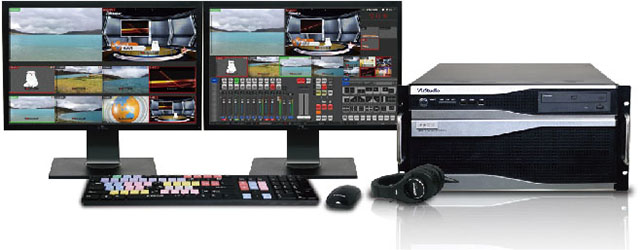
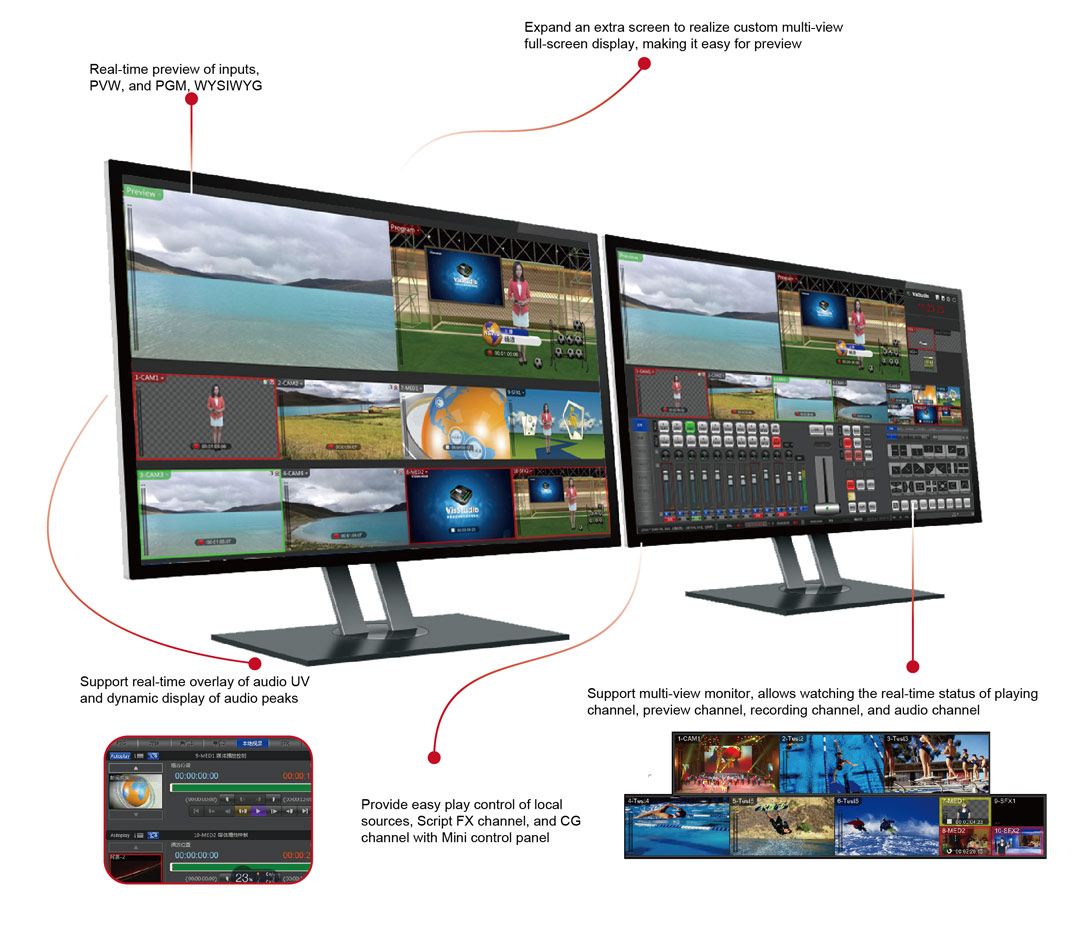
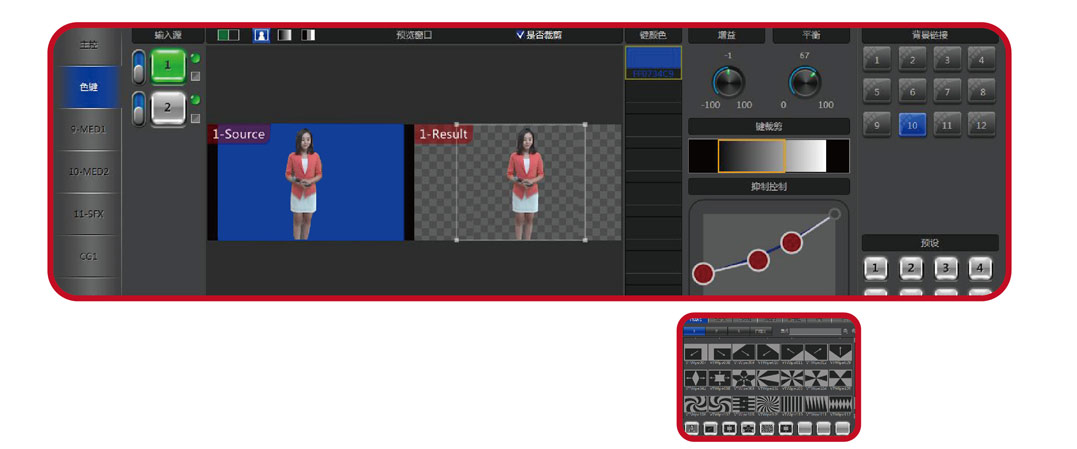
Based on Windows 64Bit OS, VisStudio is a video & audio switching system of broadcast quality. It features in video & audio switcher, audio mixer, overlay of multiple local or external CG, overlay of logo and corner marker, media recording, streaming, chroma key, virtual studio, etc., making it a perfect live production substitution for various equipments in traditional studio. VisStudio can be widely applied in various shows, sports rebroadcasting, wedding recording, and many other occasions.


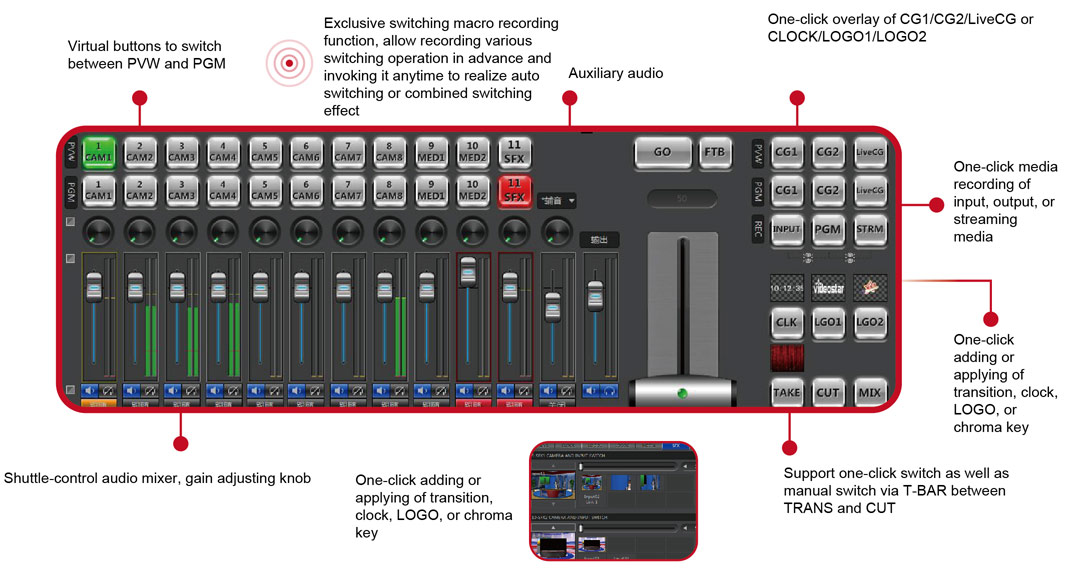
Professional UI

Compatible with a Variety of Inputs

  • Support multiple* video & audio live inputs (SDI, HDMI, Component, etc.)
  • Support 2 channels for frame-accurate clip play and playlist of local sources
  • Support 1 or 2 channel(s) for Script FX composition, create virtual studio and live picture-in-picture effect easily
  • Support 1 channel for remote VGA signal input#, realize the playout of PPT and remote screen at low cost
  • Support up to 2 local CG with custom replaceable content, allow fast modification and playout of name title and other titles
  • Support up to 2 downstream remote CG channels#, realize overlay playout of multiple-title layers by taping
  • Support 1 clock (quartz clock or digital clock) and 2 LOGO overlay (32bit-movie LOGO or image LOGO), allow changing clock, LOGO, position, and size freely, and with up to 10 preset keys

* Varies by boards or computer configuration user chooses.
# Related software needs to be installed to realize the function. (VisVGA Capture, VisCG Studio, or Windows Media Server)

Multiple Output Options to Meet the Requirements of Programming

  • 1 channel for real-time video & audio program live output* (SDI, HDMI, Component, etc.), 1 channel for real-time video & audio preview output*
  • Multiple channels for real-time Live video & audio media recording*
  • 1 channel for program media recording, allow recording CG-free video & audio file at the meantime
  • Support Windows Media streaming broadcasting#
  • XML output during switching, allow editing by EDIUS during post production

Perfect Transition Effect

Abundant Video Effects

  • Support GPU-based chroma key operation with up to 4 channels, allowing regional keying operation
  • Support up to 2 virtual studio effect, each virtual scenario supports 4 camera modes, which can be easily realized by keyframe transition

  • Hundreds of transitions (including standard wipe, 3D scroll, 3D flip, slide, door opening, blind, etc.)
  • Custom 32bit full-screen animated transition, extendable transition effect
  • Custom transition based on Script FX, allowing to design your own transition with/without modification of templates&

Videostar VisStudio is delivered as Turnkey System.
Please contact your local reseller for more information.
Metus Ingest: Video Recording, Transcoding, and Streaming Software

Edit while capture support for EDIUS

ingest Metus INGEST is the essential desktop multimedia capture, transcoding, and streaming software. Metus INGEST offers a wide set of ingest modules to import content from various sources and formats. The software is very easy to use. Every control and window required for manual operation is on a single screen.
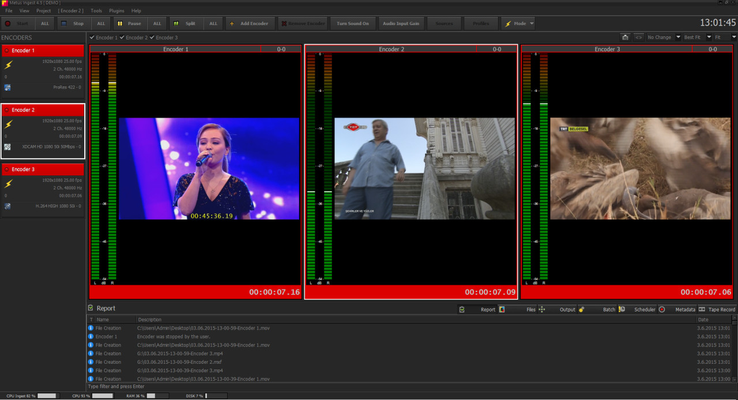
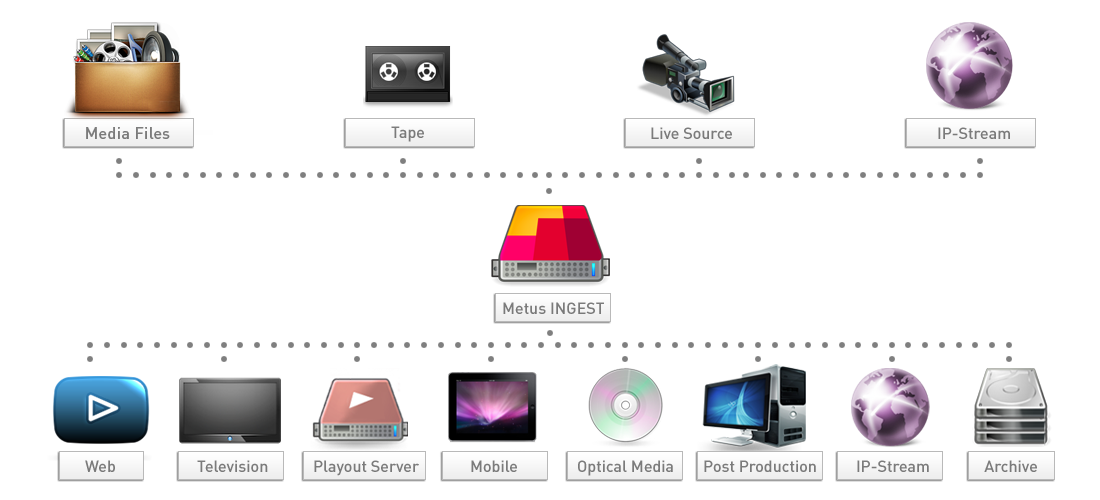
Metus INGEST is used in broadcast studios, mission critical archive operations, control rooms, media monitoring centers and research laboratories and military test sites worldwide. It allows capture without frame loss. Capture and streaming starts instantly, with. No arming period, caching time, no lost or dropped video frames. Metus Ingest is proven to be stable under continuous operation, even in 24/7 environments.

Key Features

  • LTC Timecode Support from internal or external sound card (with Blackmagic boards)
  • Detects timecode breaks
  • Closed captioning support (with AJA and Blackmagic boards)
  • Supports video matrix control (Kramer, Blackmagic, Quartz, Jupiter and Pro-Bel routers)
  • Supports still and animated logo, text, and time overlay to captured files
  • Lossless manual and auto split of files
  • Rule based media management - delete or move video files based on user defined rules
  • Supports Safe Network Recording (transfers to a network location on the fly/realtime)
  • Supports edit while capturing (With GV EDIUS and Adobe Premiere®) Avid Interplay check-in
  • Metadata input during capture
  • User defineable live action marker buttons to mark points and regions on the capturing files (like Goal, Bomb, etc)
  • Customisable front end, with individual preview screens for each encoder
  • Each channel can be individually controlled, all channels can also be globally controlled
  • IP based multi channel remote control option
  • Remote control software - control and monitor all Metus INGEST instances running on a network
  • Can be used as file based transcoder, with watch fo UHD/4K Support

Wide Format Support

Our continuously expanding set of supported video and audio formats include:
Video file wrappers: MPG, M2P, AVI, F4V, MXF, MOV, XDCAM, MP4, MPEG TS, WMV, P2, AAF
Video essences: Apple ProRes, Avid DNxHD/IMX/XDCAM/JFIF, MPEG2, DV, DVCPRO, DVCPRO50, DVCPROHD, Uncompressed, H.265/HEVC, H.264/AVC, AVC-Intra, XDCAM HD, XDCAM EX, IMX, VC-1
Audio file wrappes: WAV, M4A
Audio essences: PCM, AAC, WMA
Streaming: SD and HD H.264 and MPEG-2 streaming at UDP, RTP, RTMP

Metus Ingest is delivered as Turnkey System.
Please contact your local reseller for more information.